


Sipeed MaixCube - AIoT, Easy to Build a Facial Recognition System, Kendryte RISC-V K210
Couldn't load pickup availability
You may also like
Specification
| Kendryte K210 | |
|---|---|
| Core | RISC-V Dual-Core 64-bit, with FPU |
| Frequency | 400MHz (overclockable to 600MHz) |
| SRAM | Built-in 8M Byte |
| Image recognition | QVGA @ 60fps / VGA @ 30fps |
| Voice recognition | Microphone array (8mics) |
| Network Model | supports YOLOv3/TinyYOLOv2/face recognition, etc. |
| Deep learning framework | Support frameworks such as TensorFlow / Keras / Darknet / Caffe |
| Peripherals | FPIOA, UART, GPIO, SPI, PC, PS, TIMER |
| Hardware acceleration unit | KPU convolution operation accelerator |
| FPU floating point accelerator | |
| APU Audio processor | |
| FFT Fourier transform accelerator | |
| MaixCube Module | |
| Onboard Peripherals | Button x 3 |
| Camera x 1 | |
| RGB LED x 2 | |
| 1.3 inch TFT screen | |
| Electret Microphone x 1 | |
| 128Mbit Flash x 1 | |
| Accelerometer x 1 | |
| Onboard Interfaces | USB Type-C Interface |
| Audio interface (supports external speakers) | |
| TF card slot | |
| Grove standard interface | |
| SP-MOD interface (supports SP-MOD interface module) | |
| Power supply | USB-Type-C / Internal lithium battery (200mAh) |
| Software Development | |
| Operating system | FreeRTOS, Linux |
| Face recognition | Recognition accuracy up to 98% |
| Development environment | MaixPy IDE, PlatformlIO IDE, Arduino IDE, etc. |
| Programming languages | C, C ++, MicroPython |
Detailed Descriptions
A Wide Range of Sipeed Modules (SP-MOD) Supported
Through the SP-MOD interface on the MaixCube which is a standard 2.54mm 2x4 Pin female header, with Vcc, GND, and 6 signals, you can connect to various SP-MOD modules and extend your AI projects further.?

| 1 | Handle Module | 8 | SP-MOD One-to-Multi-Adapter Board |
|---|---|---|---|
| 2 | USB In-line Module | 9 | 1.14inch LCD module |
| 3 | Microphone Array Adapter Board | 10 | Single point ToFu Module |
| 4 | Weather Station Module | 11 | FPC Extension Module |
| 5 | PSRAM Module | 12 | Bluetooth Module |
| 6 | Credit Card Module | 13 | Ink Screen Module |
| 7 | Grove Adapter Board | 14 | LoRa Module |
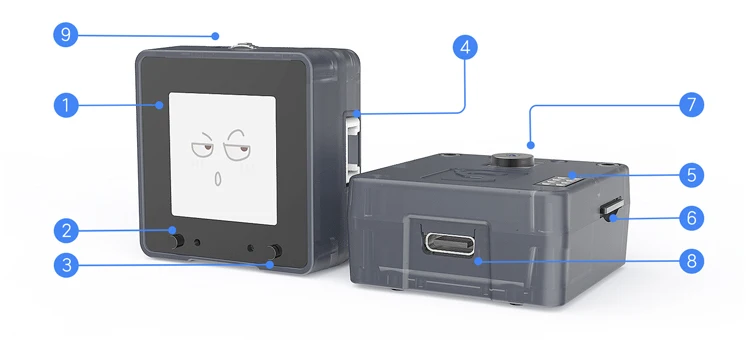
1. 1.3 inch TFT screen
2. Reset button
3. Power button
4. Grove interface
5. SP-MOD interface
6. TF card slot
7. Camera
8. Type-C interface9. Three-way button
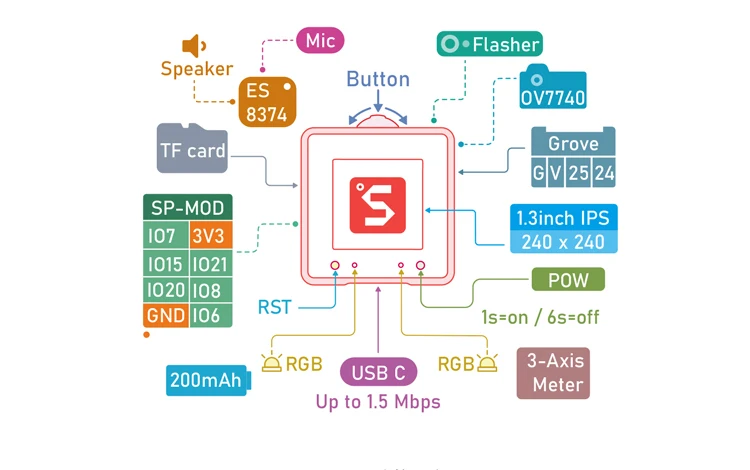 What is MaixPy?
Before getting to know about the MAIX product series, it is very necessary to understand the MaixPy project. It can help you quickly use the Al module.
MaixPy is a project of porting Micropython to K210 chip (running Micropython parser on K210), that is, users can finally control the function of K210 chip through Micropython programming. For example, you can directly call the facial recognition algorithm built into the firmware through Micropython programming, and finally generate a Micropython file, which can be downloaded to the Flash chip, and run on it. In addition, MaixPy supports the normal operation of MCU and integrates machine vision and microphone arrays to rapidly develop intelligent applications in the field of AIoT with extremely low cost and practicality.
What is the Development Environment on MaixCube?
By default, the development board has burned MaixPy firmware (the firmware source code is open source and can be downloaded from GitHub). MaixPy has developed a variety of functional libraries that developers can call directly. Maix series products use Maix IDE developed by the Sipeed team. The software is free of installation. After downloading, you can directly use MaixPy to use Micropython script syntax. Developers can edit the script on the computer and upload it to the development board to execute the script directly on the development board. The IDE can view camera images in real time and save files to the development board, which is very convenient for development.

In addition to MaixPyIDE, developers can also use ArduinoIDE, PIatformIO IDE, and other environments for development. Please refer to our technical information for details.
Please check this link https://youyeetoo.com/pages/shipping-delivery