
![ASUS Tinker Board 2S ,16GB EMMC, Official Distributor - [NEW]](http://youyeetoo.com/cdn/shop/files/ASUSTinkerBoard2SMAIN01.jpg?v=1782304771&width=3840)
![ASUS Tinker Board 2S ,16GB EMMC, Official Distributor - [NEW]](http://youyeetoo.com/cdn/shop/files/ASUSTinkerBoard2SMAIN02.png?v=1782304798&width=3840)
![ASUS Tinker Board 2S ,16GB EMMC, Official Distributor - [NEW]](http://youyeetoo.com/cdn/shop/files/ASUSTinkerBoard2SMAIN03.webp?v=1782304829&width=3840)
![ASUS Tinker Board 2S ,16GB EMMC, Official Distributor - [NEW]](http://youyeetoo.com/cdn/shop/files/ASUSTinkerBoard2SMAIN04.jpg?v=1782304860&width=3840)
![ASUS Tinker Board 2S ,16GB EMMC, Official Distributor - [NEW]](http://youyeetoo.com/cdn/shop/files/ASUSTinkerBoard2SMAIN05.webp?v=1782304890&width=3840)
ASUS Tinker Board 2S ,16GB EMMC, Official Distributor
Couldn't load pickup availability
You may also like
ASUS Tinker Board 2S
-
Quick Start
- To download the Tools, Driver, and Firmware use the following link:
https://youyeetoo.com/blog/tinker-board-2-2s-95
- To download the Tools, Driver, and Firmware use the following link:
-
Tips
-
+ Official Distributor. Check https://iot.asus.com/channel-partners/
+ Provide one-to-one technical support.
+ If there is a need for a customized AI product, please give us your feedback. It may be possible to get direct support from ASUS IOT.
-
Introduction
Tinker Board 2S——4GB Version
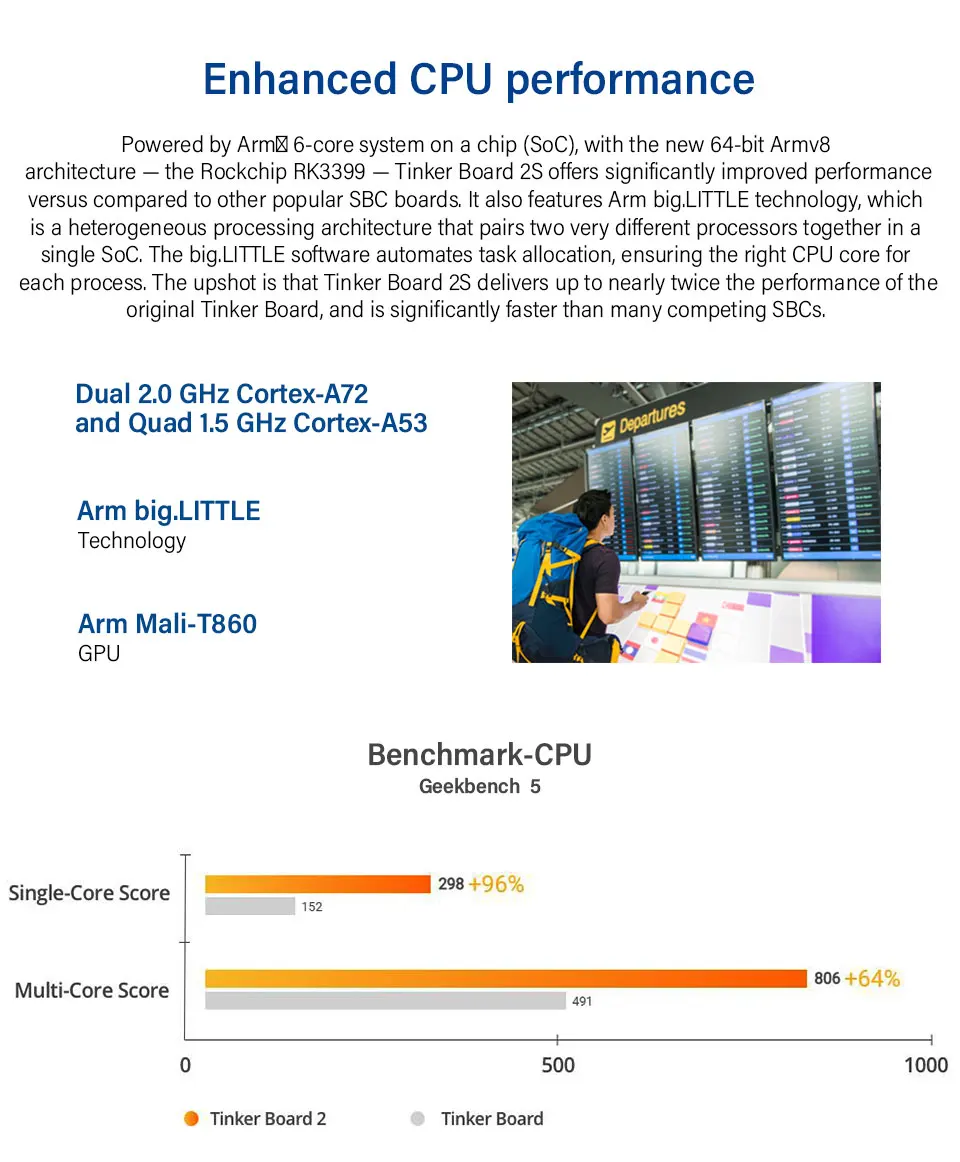
An Arm-based Single Board Computer (SBC), uses Arm Big.LITTLE™ technology’s 64-bit processor offers enhanced computing performance with low power consumption.
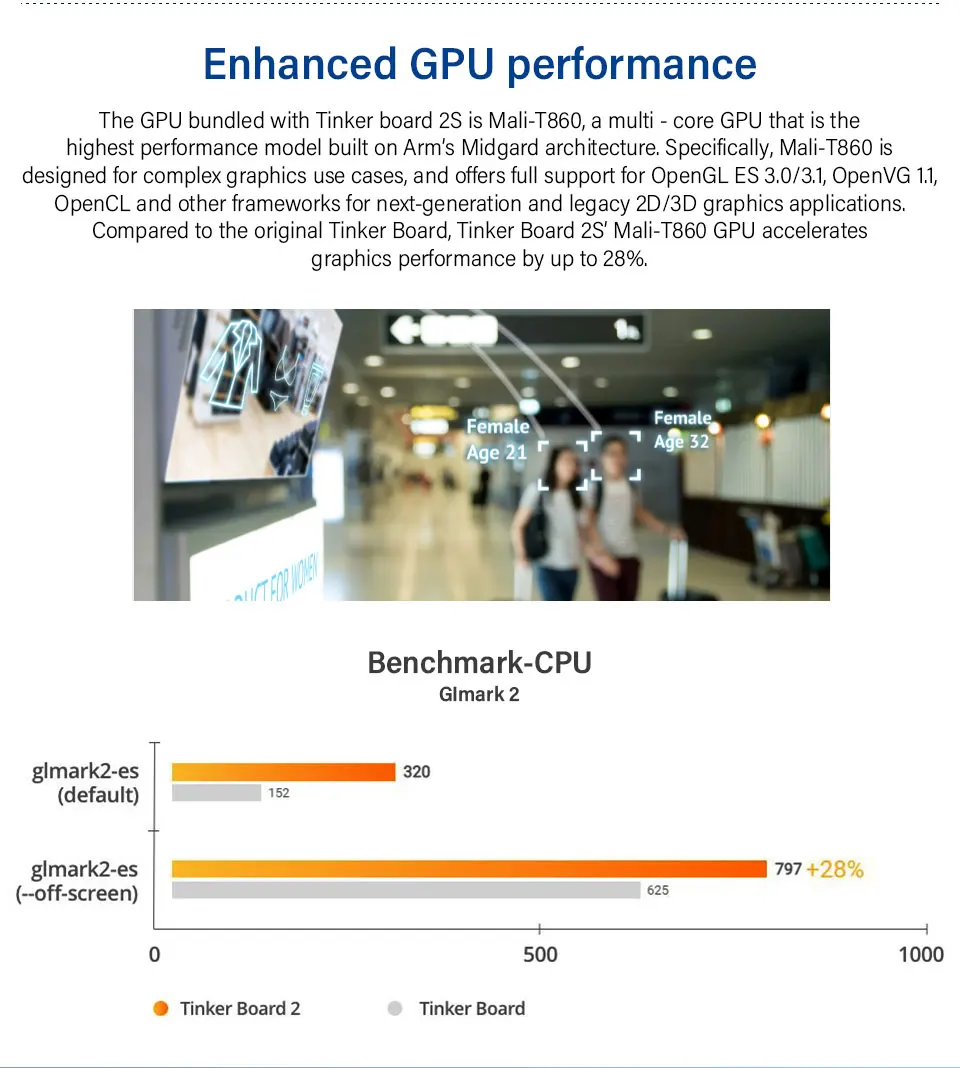
Outstanding performance for IoT devices: Powered by 6-core Rockchip RK3399 system on a chip (SoC) with the new 64-bit Armv8 architecture, plus multi-core Mali-T860.
Easy setup tool: Intui. software for performance tweaking, with a simple three-step initial configuration.
Pro-grade admin: ASUS IoT Cloud Console for data management and analysis, plus support for firmware over-the-air (FOTA) roll-out.
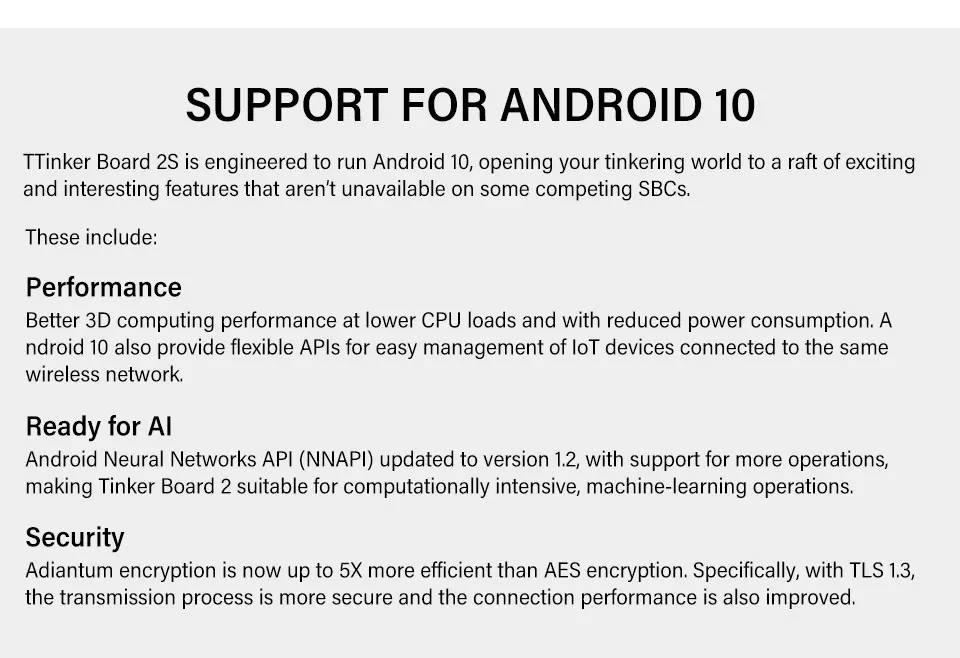
Android 10 support: Benef. from better 3D computing performance, support for the Android Neural Networks API 1.2, and Adiantum encryption with 5X-better efficiency.
Features
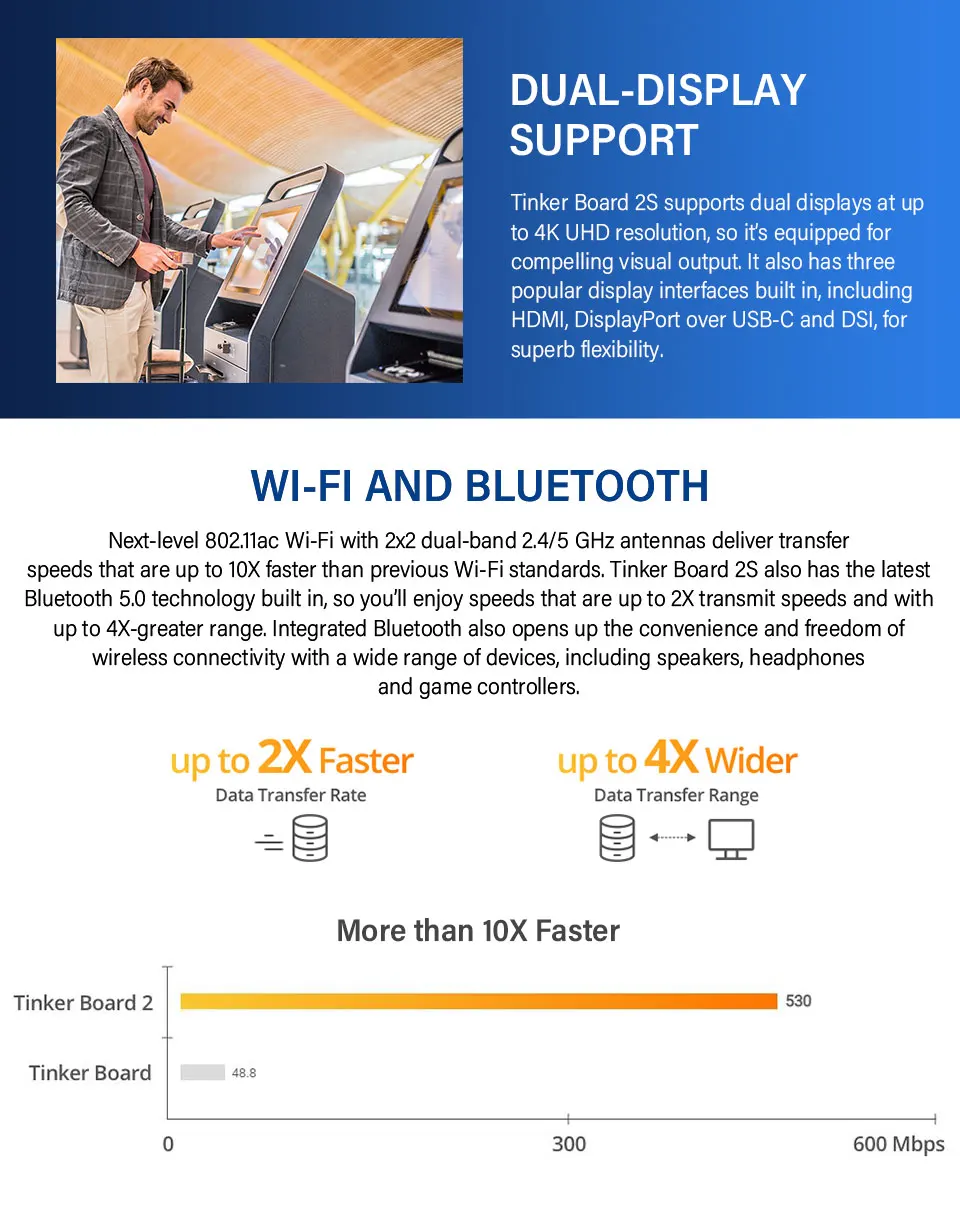
- Dual-Display Support: Tinker Board 2S supports dual displays at up to 4K UHD resolution.
- Wi-Fi and Bluetooth: 802.11ac Wi-Fi with 2x2 dual-band 2.4/5 GHz antennas, Bluetooth 5.0 technology
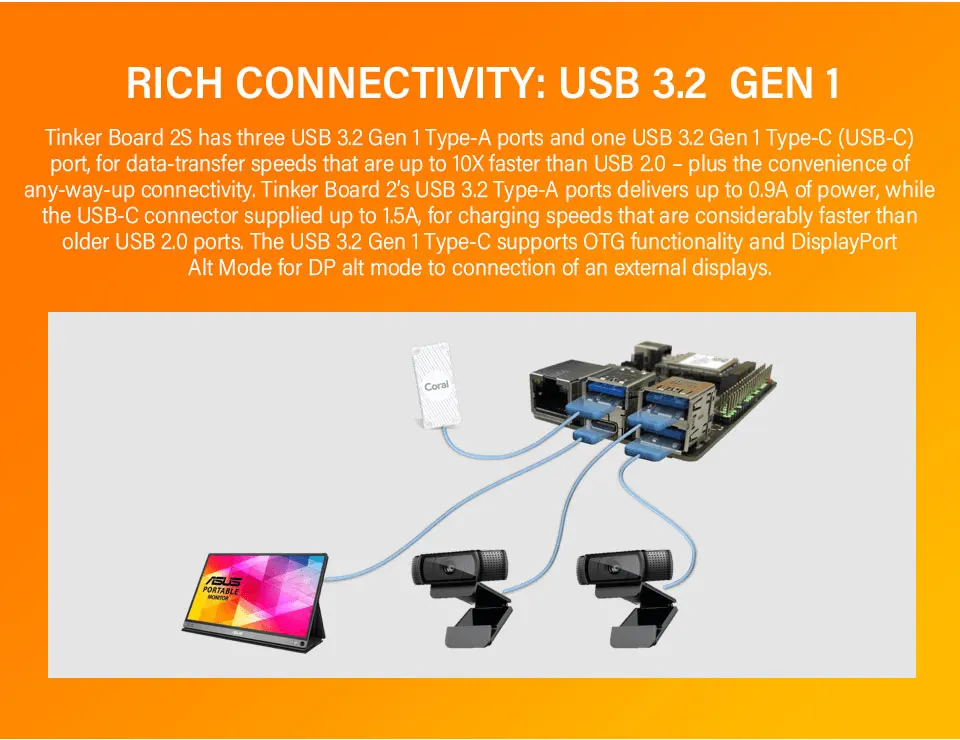
- Rich connectivity options: Tinker Board 2S offers three USB 3.2 Gen 1 Type-A ports and one USB 3.2 Gen 1 Type-C (USB-C) port
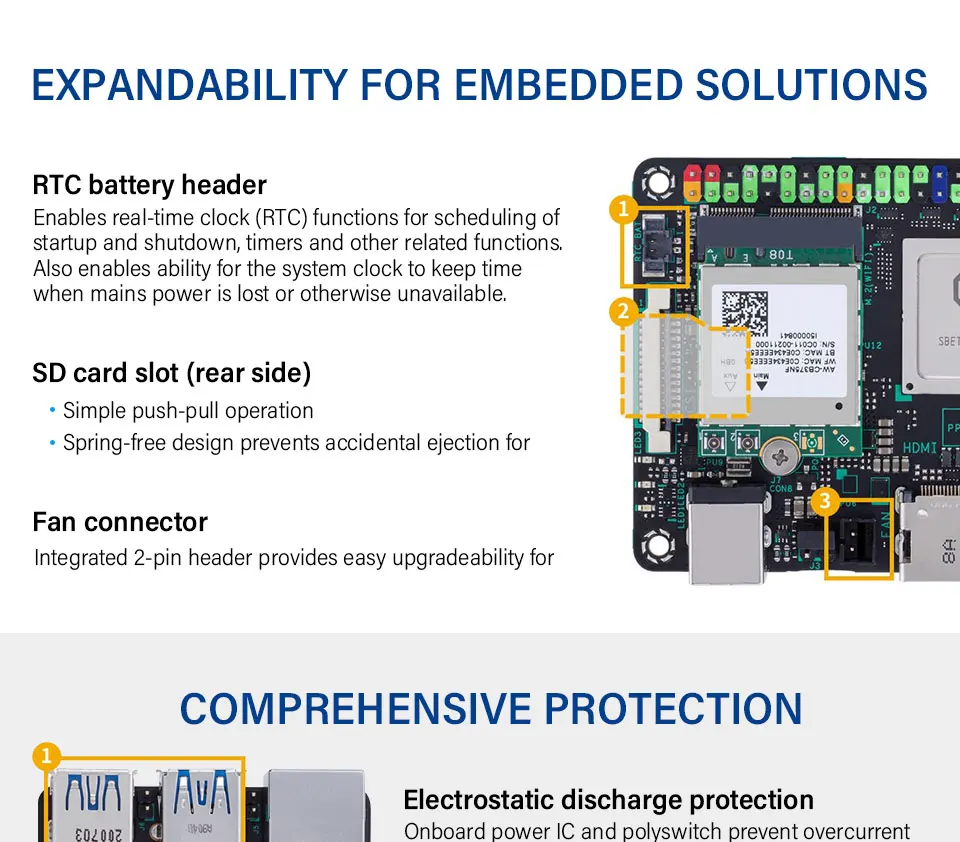
- Easily expandable for embedded solutions: RTC battery header, SD card slot, Fan connector
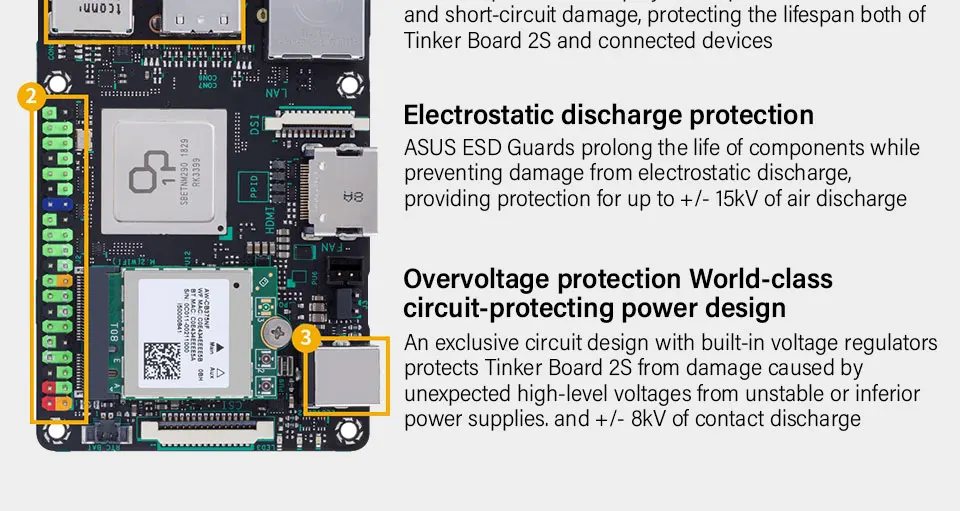
- Built-in protection for your peace of mind: Short-circuit damage prevention, Electrostatic discharge protection, Overvoltage protection
- Easy setup: Have your Tinker Board 2S up and running in no time! It includes a flexible setup tool enabling you to tweak settings to perfectly match the way you work. Initial configuration follows just three simple steps.
- IT Management Software: ASUS IoT Cloud Console, ASUS Industrial Android FOTA
Shipping List
Based on your choice.
Specification
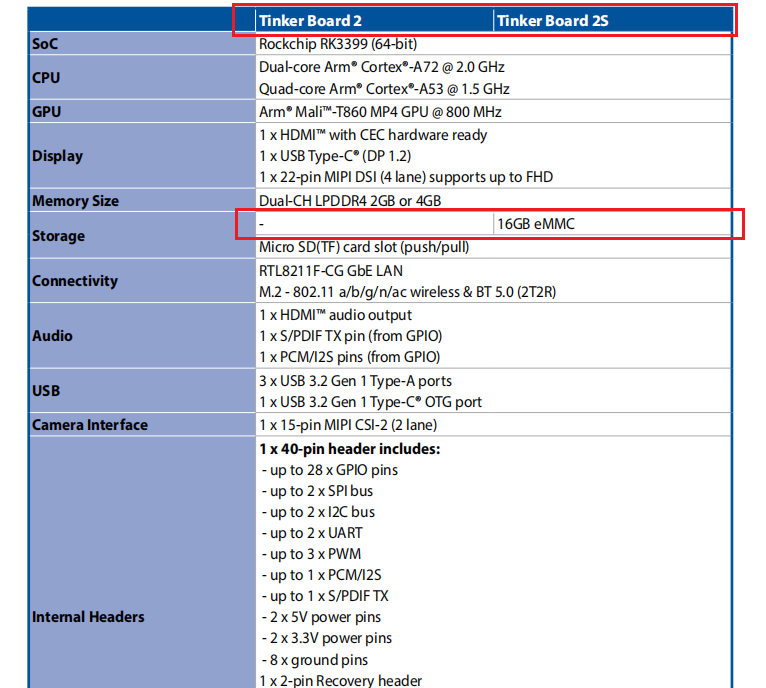
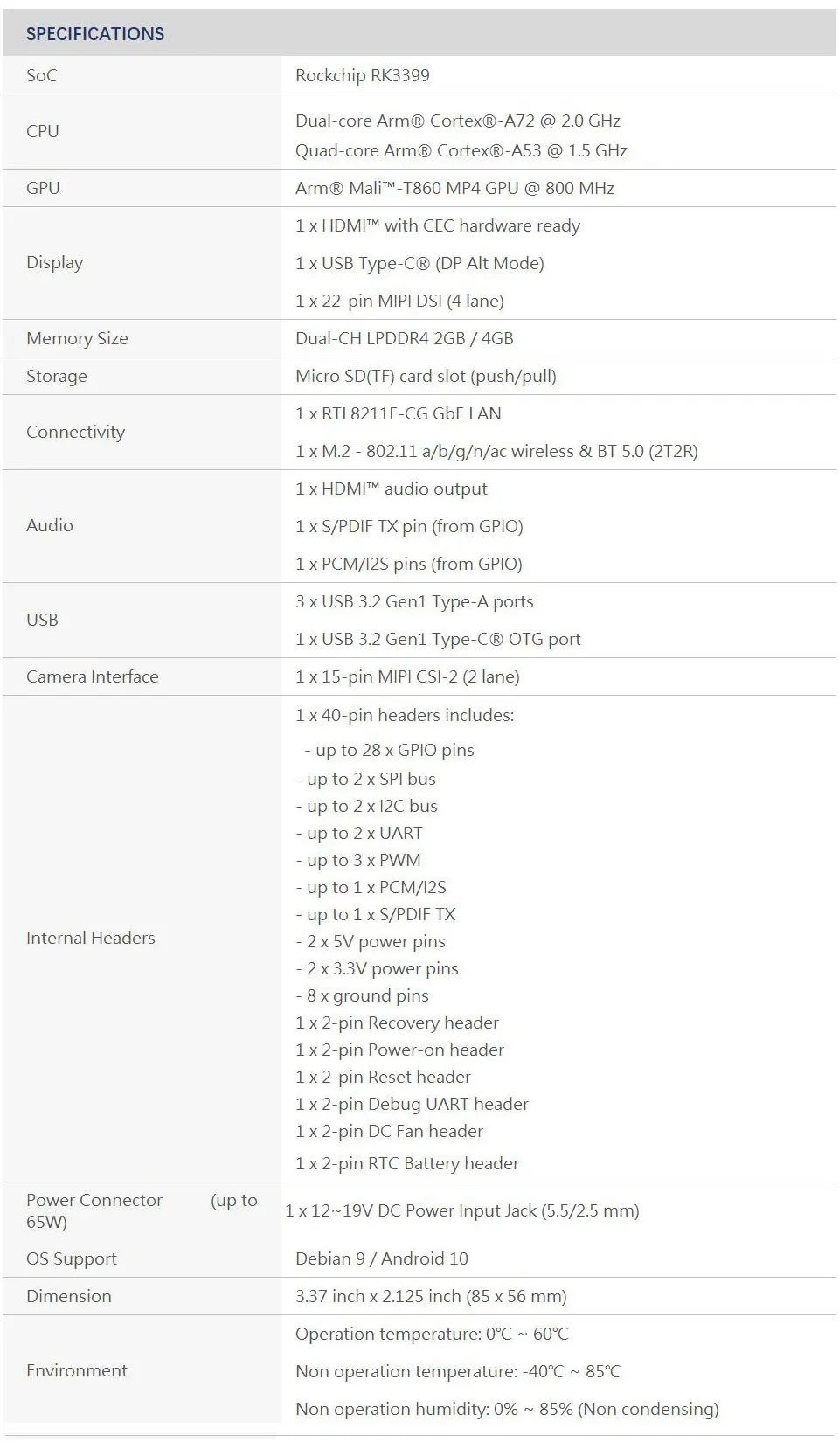
SoC: Rockchip RK3399
CPU: Dual-core Arm® Cortex®-A72 @ 2.0 GHz, Quad-core Arm® Cortex®-A53 @ 1.5 GHz
GPU: Arm® Mali™-T860 MP4 GPU @ 800 MHz
Display: 1 x HDMI™ with CEC hardware ready, 1 x USB Type-C® (DP Alt Mode), 1 x 22-pin MIPI DSI (4 lane)
Memory: Dual-CH LPDDR4 4GB
Storage: 16GB eMMC, Micro SD(TF) card slot (push/pull)
Connectivity: 1 x RTL8211F-CG GbE LAN, 1 x M.2 - 802.11 a/b/g/n/ac wireless & BT 5.0 (2T2R)
Audio: 1 x HDMI™ audio output, 1 x S/PDIF TX pin (from GPIO), 1 x PCM/I2S pins (from GPIO)
USB: 3 x USB 3.2 Gen1 Type-A ports, 1 x USB 3.2 Gen1 Type-C® OTG port
Camera Interface: 1 x 15-pin MIPI CSI-2 (2 lane)
Internal Headers: 1 x 40-pin headers includes:
- up to 28 x GPIO pins
- up to 2 x SPI bus
- up to 2 x I2C bus
- up to 2 x UART
- up to 3 x PWM
- up to 1 x PCM/I2S
- up to 1 x S/PDIF TX
- 2 x 5V power pins
- 2 x 3.3V power pins
- 8 x ground pins
1 x 2-pin Recovery header
1 x 2-pin Power-on header
1 x 2-pin Reset header
1 x 2-pin Debug UART header
1 x 2-pin DC Fan header
1 x 2-pin RTC Battery header
Power Connector (up to 45W): 1 x 12∼19V DC Power Input Jack (5.5/2.5 mm)
OS Support: Debian 9 / Android 10
Dimensions: 85 x 56 mm
Operation temperature: 0℃ ∼ 60℃
Detailed Descriptions
Note: Tinkerboard 2 vs. Tinkerboard 2S

EASY SETUP TOOL
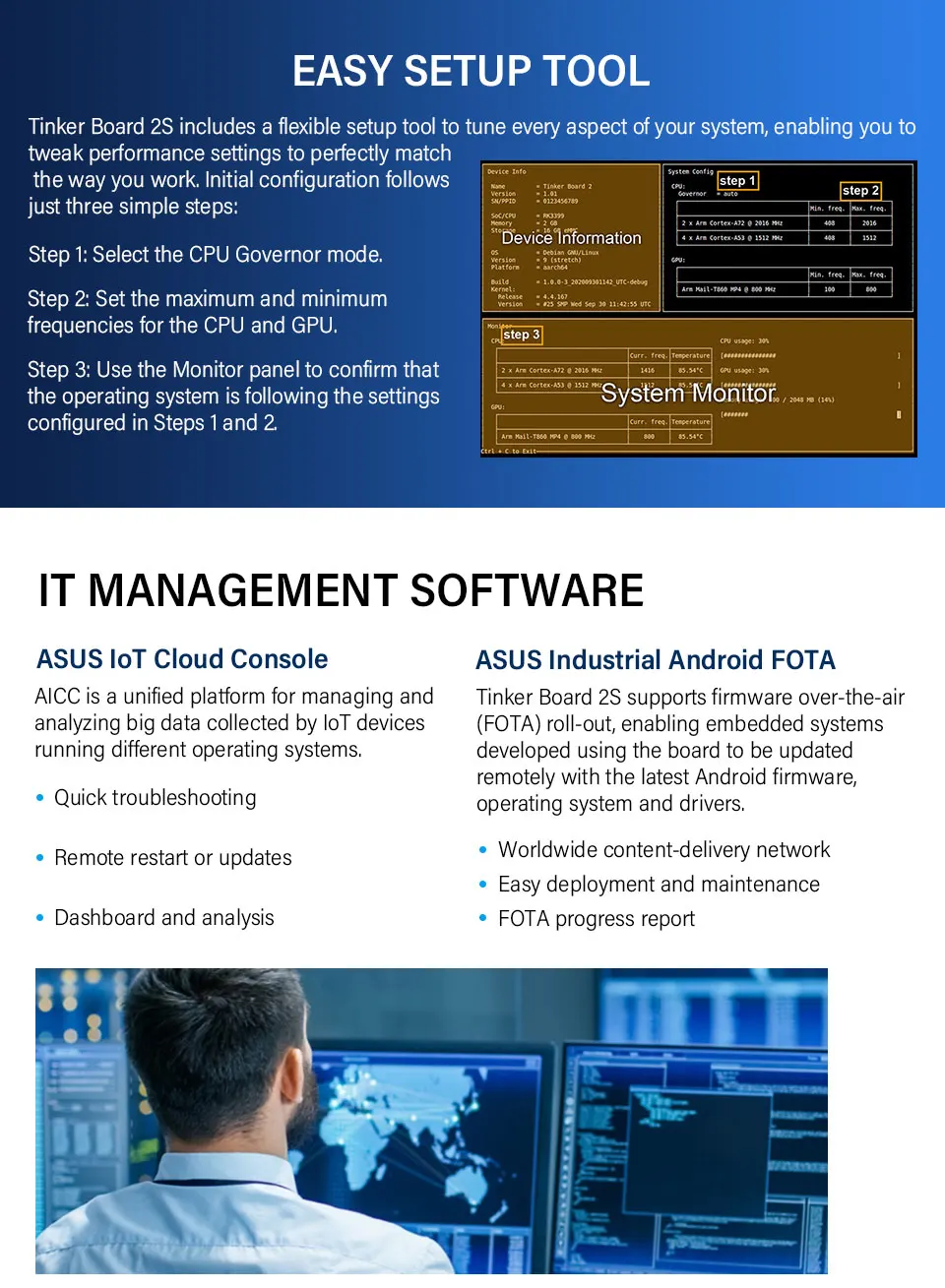
Tinker Board 2S includes a flexible setup tool to tune every aspect of your system, enabling you to tweak performance settings to perfectly match the way you work. Initial configuration follows just three simple steps:
Step 1: Select the CPU Governor mode.
Step 2: Set the maximum and minimum frequencies for the CPU and GPU.
Step 3: Use the Monitor panel to confirm that the operating system is following the settings configured in Steps 1 and 2.

Please check this link https://youyeetoo.com/pages/shipping-delivery