Intel N100 Embedded Integration Guide: From Module Selection to Standalone Hardware Test
Integrating an Intel N100 processor into custom embedded products requires understanding three deployment options: System-on-Module (SOM), complete Single Board Computer (SBC), and Mini PC. This guide covers the complete integration workflow—from selecting the right form factor to performing standalone hardware tests and addressing real-world integration challenges. We'll use the youyeetoo K1 as a practical example, demonstrating how an 82×71mm Intel N100 SOM can work both as a standalone compute module and as part of a complete embedded system. Whether you're building industrial automation equipment, edge AI gateways, or smart kiosks, this guide provides the technical foundation you need.
Key Takeaways:
- Module Selection Framework: SOM vs Complete SBC vs Mini PC decision criteria
- Standalone Hardware Test: Step-by-step validation of SOM B independent operation with real power and thermal data
- Integration Considerations: Thermal, power, I/O, and multi-display design patterns with critical hardware limitations
What is Intel N100 Embedded Integration?
Intel N100 embedded integration is defined as the process of incorporating Intel's 12th Gen Alder Lake-N N100 processor into custom embedded products, typically through System-on-Module (SOM) or Single Board Computer (SBC) form factors.
The Intel N100 is a quad-core processor (4 cores, 4 threads) with a CPU base frequency of 0.8GHz and turbo boost up to 3.4GHz. The integrated GPU has a maximum frequency of 750MHz. It features a 6W TDP (configurable from 4.5W to 25W) and integrated Intel UHD Graphics. The processor supports both Windows 10/11 and Linux, making it versatile for industrial and commercial applications.
Three Integration Form Factors:
- SOM (System-on-Module): Core board only, requires custom carrier board design or minimal adapter boards for standalone use
- Complete SBC: SOM + carrier board, ready to use with standard I/O
- Mini PC: Enclosed system with housing and certifications, plug-and-play
Common Use Cases:
- Industrial automation (PLC, HMI, SCADA systems)
- Edge AI gateways and inference appliances
- Smart kiosks and digital signage
- Network appliances (firewall, router, NAS)
- Industrial PCs and control systems
Intel N100 Module Selection: SOM vs Complete SBC vs Mini PC
Choosing the right form factor depends on your development timeline, customization needs, and production volume.
| Form Factor |
Size |
Flexibility |
Development Effort |
Best For |
Typical Cost |
| SOM (Core Board) |
Smallest (60-85mm) |
Highest |
Requires carrier board design (3-6 months) OR minimal adapters for standalone |
Custom embedded products, OEM integration, high-volume production |
$139-$207 |
| Complete SBC |
Medium (85-135mm) |
Medium |
Plug-and-play with standard I/O |
Rapid prototyping, low-volume production, evaluation |
$179-$258 |
| Mini PC |
Largest (100-200mm) |
Lowest |
Out-of-box ready |
Industrial PC replacement, turnkey solutions, certified systems |
$300-$600 |
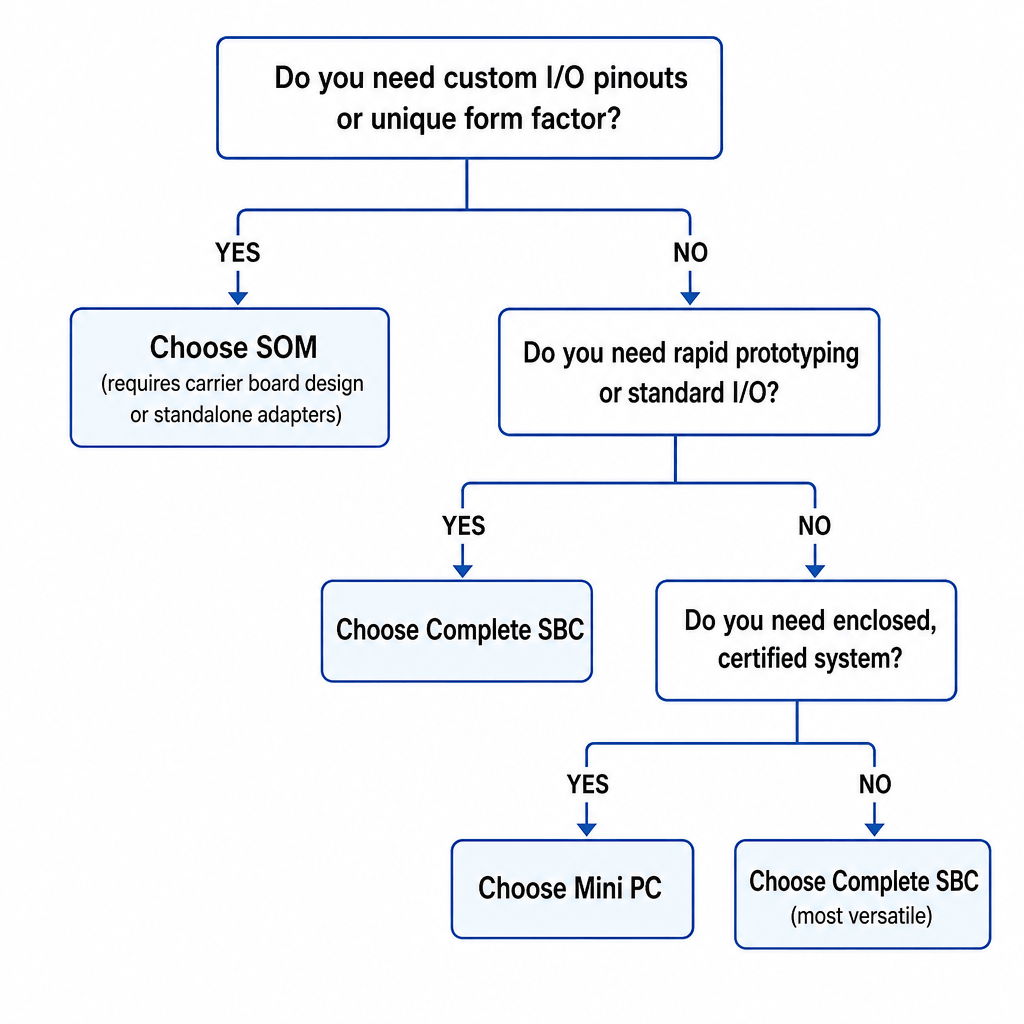
Decision Framework:
Do you need custom I/O pinouts or a unique form factor?
├─ YES ➔ Choose SOM (requires carrier board design or standalone adapters)
└─ NO ➔ Move to the next evaluation criteria:
Do you need rapid prototyping or standard I/O layout?
├─ YES ➔ Choose Complete SBC
└─ NO ➔ Do you require a fully enclosed and pre-certified system?
├─ YES ➔ Choose Mini PC
└─ NO ➔ Choose Complete SBC (most versatile approach)
Key Considerations:
- Size constraints: SOMs offer the smallest footprint (youyeetoo K1: 82×71mm)
- I/O requirements: Custom I/O needs SOM + custom carrier; standard I/O uses complete SBC
- Development timeline: SOMs require 3-6 months for carrier design; SBCs are ready in days; standalone SOM with adapters ready in hours
- Production volume: High volume (>1000 units) justifies SOM investment; low volume uses SBC
- Certification needs: Pre-certified Mini PCs save compliance costs (FCC, CE, UL)
Intel N100 Module Comparison: youyeetoo K1 vs LattePanda Mu
When selecting an Intel N100 SOM, compare specifications, pricing, and differentiation features.
| Product |
Core Board Size |
Price (Reference Config) |
Display Interfaces |
I/O Highlights |
Operating Temp |
Key Advantage |
| youyeetoo K1 |
82×71mm |
$207 (8GB+128GB Core) |
HDMI + Mini HDMI + MIPI DSI + eDP |
Dual GbE LAN, 4x UART, 22x GPIO, Optional NFC |
-20°C ~ 60°C |
MIPI DSI + eDP + dual LAN + wide temp + larger built-in storage |
| LattePanda Mu |
60×69mm |
$198 (8GB+64GB Kit) |
HDMI + DP |
More PCIe lanes, smaller size |
0°C ~ 60°C |
Smallest size, most PCIe lanes, competitive kit pricing |
Honest Competitive Assessment:
- LattePanda Mu: Smaller footprint (60×69mm vs K1's 82×71mm) and more PCIe lanes make it ideal for compact designs requiring high-speed peripherals. Highly cost-effective ecosystem with starter options like the $198 Starter Kit (8GB+64GB) available via official DFRobot distribution channels.
youyeetoo K1 Differentiation:
- MIPI DSI + eDP interfaces: Direct connection to industrial touch panels without HDMI-to-MIPI converters (saves $50+ per unit). Note: MIPI DSI, eDP, and Type-C display are BIOS-level 3-choose-1 options requiring firmware reflash to switch.
- Dual Gigabit Ethernet on carrier board: Native dual LAN for network appliances, no USB-to-Ethernet adapters needed
- Windows 10/11 and Linux native I/O API support: 4x UART, 1x I2C, 1x SPI, 22x GPIO accessible via Intel APIs without third-party drivers
- Optional Passive NFC: Industrial automation and access control integration
- Wide operating temperature: -20°C ~ 60°C fanless operation for harsh environments
- SOM B standalone capability: Can operate independently with minimal adapter boards
- 4G LTE expansion: M.2 E-key slot supports 4G LTE modules via official adapter board (requires separate 4G adapter board)
Can Intel N100 SOM Work Standalone? A Hands-On Test with youyeetoo K1
Yes, the Intel N100 SOM can work standalone without a full carrier board, but it requires compact adapter boards and a USB-C hub for I/O expansion. This test demonstrates the youyeetoo K1 SOM B (core board only) working independently using minimal breakout hardware.
Important: Only the K1 SOM B version supports standalone operation. The SOM A version (included in development kits) requires the full carrier board and cannot operate independently.
What You Need for Standalone Operation
Hardware Components:
- youyeetoo K1 SOM B core board (82×71mm)
- Active cooling heatsink with fan (pre-installed)
- 12V/2A DC power adapter
- DC Power adapter board (converts barrel jack to core board power connector)
- TypeC Display OCP adapter board (provides USB-C display output from core board)
- USB-C hub/dock (for HDMI, USB ports, Ethernet)
- HDMI cable + monitor
- Optional: USB keyboard/mouse, Ethernet cable
Why This Configuration?
The K1 core board exposes display and power through high-density B2B connectors designed for carrier board integration. For standalone use, two compact adapter boards break out these signals:
- DC Power Board: Converts standard 12V barrel jack to core board power connector
- TypeC Display OCP Board: Routes display signals (HDMI/DP) to USB-C output
A USB-C hub then provides standard I/O: HDMI display output, USB ports, Ethernet, and additional peripherals.
Step 1: Assemble the Standalone Configuration
- Ensure the active cooling heatsink is properly mounted on the K1 core board (thermal pad pre-applied, fan connector attached)
- Connect the DC Power adapter board to the core board's power connector
- Connect the TypeC Display OCP adapter board to the core board's display connector
- Plug the 12V/2A power adapter into the DC Power board (do not power on yet)
- Connect the USB-C hub to the TypeC Display OCP board
- Connect HDMI cable from the USB-C hub to your monitor
- Connect USB keyboard/mouse to the USB-C hub
- Verify all connections before powering on
Step 2: Power-On Test
- Switch on the 12V power adapter
- Observe the power LED on the core board (should light up immediately)
- Listen for fan spin-up (active cooling starts within 2-3 seconds)
Measured Power Consumption (Standalone Configuration):
- Idle (BIOS): 4.2W
- Boot (OS loading): 8.1W
- Desktop idle (Windows 11): 6.5W
Step 3: System Boot and Display Output
- BIOS splash screen appears on the monitor within 3-5 seconds
- Press DEL or F2 to enter BIOS setup (optional)
- Boot into pre-installed OS (Windows 11 or Linux)
Measured Boot Time:
- Cold boot (power-on to Windows desktop): 15 seconds
- Warm reboot: 12 seconds
Standalone vs Full Carrier Board: When to Use Each
| Configuration |
Size |
I/O Availability |
Best For |
Cost |
| Standalone (SOM B + adapters + USB-C hub) |
Minimal (82×71mm core board) |
Limited to USB-C hub capabilities |
Space-constrained embedded integration, rapid prototyping, OEM evaluation |
Lower (core board + adapters ~$220) |
| Full Carrier Board (SOM + 134×92mm carrier) |
Larger (134×92mm total) |
Native dual GbE, MIPI DSI, eDP, 4x UART, 22x GPIO, multiple USB, SATA |
Production deployment, industrial automation, multi-display systems, network appliances |
Higher (complete kit ~$258) |
Standalone Configuration Advantages:
- Smallest possible footprint (82×71mm)
- Lower cost for evaluation and prototyping
- Flexible I/O via USB-C hub selection
- Easier to integrate into custom enclosures
Full Carrier Board Advantages:
- Native dual Gigabit Ethernet (no USB-to-Ethernet)
- Direct MIPI DSI and eDP display interfaces (BIOS-selectable)
- Industrial I/O (4x UART, 1x I2C, 1x SPI, 22x GPIO) without adapters
- SATA 3.0 for additional storage
- M.2 E-key for Wi-Fi 6 or 4G LTE (4G requires official adapter board)
- More robust for 24/7 industrial deployment
Conclusion: The youyeetoo K1 SOM B successfully operates standalone with minimal adapter hardware. This configuration is ideal for space-constrained embedded products, rapid prototyping, and OEM evaluation. For production deployment requiring industrial I/O, multi-display support, or dual Ethernet, the full carrier board configuration is recommended.
Key Integration Considerations for Intel N100 Embedded Designs
Thermal Management
Passive vs Active Cooling Decision Matrix:
| Scenario |
Cooling Type |
K1 Example |
| Ambient ≤ 25°C, intermittent load |
Passive heatsink |
Aluminum heatsink, 65°C max |
| Ambient 25-40°C, continuous load |
Active cooling (fan) |
5V fan, 48°C max |
| Ambient > 40°C or enclosed case |
Active + forced airflow |
Industrial fan + ventilation |
K1 Thermal Specifications:
- Operating temperature: -20°C ~ 60°C
- Storage temperature: -40°C ~ 85°C
- Passive cooling sufficient for ≤ 80% CPU load at 25°C ambient
Power Delivery
Power Supply Options:
- DC 12V/2A (standard): Barrel jack, 24W max
- PoE (Power over Ethernet): Requires PoE-capable carrier board (K1 carrier supports PoE with optional module)
- Wide voltage input: Some carrier boards support 9-36V for automotive/industrial use
K1 Power Consumption:
- Idle: 4.2W
- Typical workload: 6-8W
- Peak (stress test): 12W
- Recommended PSU: 12V/2A (24W) minimum
I/O and Peripheral Integration
K1 I/O Specifications:
- UART: 4x (expandable to RS232/RS485 with level shifters)
- I2C: 1x (3.3V logic level)
- SPI: 1x (3.3V logic level)
- GPIO: 22x (3.3V logic level)
- USB: 4x USB 3.2 Gen 2 (10Gbps) + 2x USB 2.0
- Ethernet: 2x Gigabit LAN (Intel I226-V controller)
- Storage: 1x M.2 M-key (NVMe PCIe 3.0 x4) + 1x SATA 3.0
Note: All GPIO, I2C, SPI, and UART interfaces operate at 3.3V logic level. Use level shifters for 5V or industrial voltage (12V/24V) peripherals.
Multi-Display Configuration and Limitations
K1 Display Interfaces:
- 1x HDMI 2.0 (up to 4K@60Hz)
- 1x Mini HDMI (up to 4K@60Hz)
- 1x MIPI DSI (4-lane, up to 1920×1200)
- 1x eDP (up to 4K@60Hz)
- 1x USB Type-C with DisplayPort Alt Mode
Critical Limitation: MIPI DSI, eDP, and Type-C DisplayPort are BIOS-level 3-choose-1 options. Only one of these three interfaces can be active at a time. Switching between them requires BIOS firmware reflash. HDMI and Mini HDMI can be used simultaneously with any of the three options.
Practical Multi-Display Configurations:
- Dual HDMI: HDMI + Mini HDMI (always available, no BIOS change needed)
- HDMI + Industrial Panel: HDMI + MIPI DSI (requires MIPI BIOS)
- HDMI + Laptop Display: HDMI + eDP (requires eDP BIOS)
- Triple Display: HDMI + Mini HDMI + MIPI DSI (requires MIPI BIOS)
4G LTE Expansion:
The K1 carrier board includes an M.2 E-key slot that supports 4G LTE modules. However, 4G LTE expansion requires an official adapter board to properly route antenna signals and provide SIM card slot. The M.2 E-key slot can alternatively be used for Wi-Fi 6/6E modules without additional adapters.
Real-World Integration Examples
Example 1: Industrial Kiosk with MIPI DSI Touch Panel
Application: Self-service kiosk for factory floor data entry
Hardware Configuration:
- youyeetoo K1 complete kit (SOM + carrier board)
- 10.1" industrial MIPI DSI capacitive touch panel (1920×1200)
- Passive cooling (enclosed kiosk with ventilation)
- 12V/3A industrial power supply
- USB barcode scanner
Key Design Decisions:
- MIPI DSI eliminates HDMI-to-MIPI converter ($50 savings per unit)
- Passive cooling sufficient for 24/7 operation in climate-controlled factory
- Dual Ethernet: one for factory network, one for isolated data collection
- Windows 10 IoT Enterprise for long-term support
Measured Performance:
- Boot time: 18 seconds (Windows 10 IoT + custom app autostart)
- Average power: 7.5W
- Operating temperature: 45°C (ambient 25°C, passive cooling)
- Uptime: 99.8% over 6 months (2 reboots for Windows updates)
Example 2: Edge AI Gateway for Video Analytics
Application: Real-time video analytics for retail foot traffic monitoring
Hardware Configuration:
- youyeetoo K1 complete kit
- 4x USB 3.0 cameras (1080p@30fps each)
- Active cooling (5V fan)
- PoE power delivery (optional PoE module on carrier board)
- 256GB NVMe SSD for video buffering
Key Design Decisions:
- Intel UHD Graphics handles 4-stream video decode + OpenVINO inference
- Dual Ethernet: one for camera network, one for cloud upload
- PoE eliminates separate power cable (single Cat6 cable deployment)
- Ubuntu 22.04 LTS + Docker for containerized AI models
Measured Performance:
- Video processing: 4x 1080p@30fps simultaneous decode
- AI inference: 15 FPS person detection (OpenVINO INT8 quantization)
- Average power: 11W (4 cameras + processing)
- Network throughput: 180 Mbps sustained upload (H.264 compressed)
Example 3: Industrial Automation Controller
Application: PLC replacement for packaging line control
Hardware Configuration:
- youyeetoo K1 complete kit
- 4x UART to RS485 converters (Modbus RTU communication)
- 22x GPIO for sensor/actuator control (via level shifters to 24V industrial logic)
- Passive cooling with aluminum enclosure as heatsink
- 24V to 12V DC-DC converter for industrial power rail
Key Design Decisions:
- 4x UART enables simultaneous Modbus communication with 4 device chains
- GPIO + level shifters interface with 24V industrial sensors/relays
- Dual Ethernet: one for SCADA network, one for MES integration
- Real-time Linux kernel (PREEMPT_RT patch) for deterministic control
Measured Performance:
- Control loop latency: 5ms average (GPIO read → Modbus write → GPIO output)
- Modbus throughput: 115200 baud on all 4 UART channels simultaneously
- Average power: 6.8W
- Operating temperature: 52°C (ambient 35°C, passive cooling in IP65 enclosure)
Frequently Asked Questions
Q1: Can the youyeetoo K1 core board work standalone without a carrier board?
Yes, but only the K1 SOM B version supports standalone operation. You need two compact adapter boards (DC Power Board + TypeC Display OCP Board) plus a USB-C hub for I/O expansion. The SOM A version (included in development kits) requires the full carrier board and cannot operate independently. Standalone configuration is ideal for space-constrained prototypes and OEM evaluation.
Q2: What is the difference between Intel N100 SOM and complete SBC?
A SOM (System-on-Module) is the core board only (CPU, RAM, storage) requiring a custom carrier board or adapter boards for I/O. A complete SBC includes both the SOM and a carrier board with standard I/O (USB, Ethernet, HDMI, GPIO) ready to use. Choose SOM for custom embedded products with unique I/O requirements; choose complete SBC for rapid prototyping and standard applications.
Q3: Can I use MIPI DSI, eDP, and Type-C display simultaneously on the K1?
No. MIPI DSI, eDP, and Type-C DisplayPort are BIOS-level 3-choose-1 options. Only one of these three interfaces can be active at a time, and switching requires BIOS firmware reflash. However, HDMI and Mini HDMI can be used simultaneously with any of the three options, enabling dual or triple display configurations (e.g., HDMI + Mini HDMI + MIPI DSI).
Q4: What cooling solution do I need for 24/7 industrial operation?
For ambient temperatures ≤ 25°C with intermittent load, passive cooling (aluminum heatsink) is sufficient. For ambient 25-40°C or continuous load, use active cooling (5V fan). For ambient > 40°C or enclosed cases, use active cooling with forced airflow and ventilation. The K1 operates from -20°C to 60°C ambient with appropriate cooling.
Q5: How many UART/I2C/GPIO interfaces does the K1 provide?
The K1 provides 4x UART, 1x I2C, 1x SPI, and 22x GPIO on the carrier board. All interfaces operate at 3.3V logic level. UARTs can be expanded to RS232/RS485 with level shifters. GPIO can interface with 24V industrial logic using appropriate level shifters. All interfaces are accessible via Intel APIs on Windows 10/11 and Linux without third-party drivers.
Q6: Can I add 4G LTE connectivity to the K1?
Yes, the K1 carrier board includes an M.2 E-key slot that supports 4G LTE modules. However, 4G LTE expansion requires an official adapter board to properly route antenna signals and provide a SIM card slot. The M.2 E-key slot can alternatively be used for Wi-Fi 6/6E modules without additional adapters.
Q7: What is the power consumption of the K1 in typical embedded applications?
Idle: 4.2W | Typical workload (web browsing, light processing): 6-8W | Peak (stress test, video encoding): 12W. For 24/7 industrial deployment, budget 8-10W average. Use a 12V/2A (24W) power supply minimum. PoE power delivery is supported with an optional PoE module on the carrier board.
Q8: How does the K1 compare to Raspberry Pi for industrial applications?
The K1 offers significantly higher CPU performance (x86-64 vs ARM), native Windows 10/11 support, dual Gigabit Ethernet, more GPIO/UART interfaces, and wider operating temperature range (-20°C to 60°C vs 0°C to 50°C). Raspberry Pi has lower cost, larger community, and more accessories. Choose K1 for industrial automation, Windows applications, and multi-network appliances; choose Raspberry Pi for hobbyist projects and cost-sensitive deployments.
Q9: What operating systems are supported on the K1?
The K1 officially supports Windows 10, Windows 11, and Linux (Ubuntu, Debian, Fedora tested). All I/O interfaces (GPIO, UART, I2C, SPI) are accessible via Intel APIs on both Windows and Linux without third-party drivers. Real-time Linux (PREEMPT_RT kernel) is supported for deterministic industrial control applications.
Q10: What is the typical development timeline for a custom carrier board?
Custom carrier board design typically takes 3-6 months: 4-6 weeks for schematic design, 2-3 weeks for PCB layout, 2-3 weeks for prototype fabrication, 4-8 weeks for testing and iteration. For faster time-to-market, consider using the K1 complete SBC for prototyping, then design a custom carrier board only if production volume justifies the investment (typically >1000 units).
Technical Specifications Summary
| Component |
Specification |
| Processor |
Intel N100 (4C/4T, 0.8GHz base, 3.4GHz turbo, 6W TDP) |
| GPU |
Intel UHD Graphics (24 EUs, 750MHz max) |
| Memory |
8GB or 16GB LPDDR5 |
| Storage |
0GB / 64GB / 128GB / 256GB eMMC + M.2 NVMe slot |
| Display |
HDMI 2.0 + Mini HDMI + MIPI DSI / eDP / Type-C DP (3-choose-1) |
| Networking |
2x Gigabit Ethernet (Intel I226-V) + M.2 E-key for Wi-Fi/4G |
| I/O |
4x UART, 1x I2C, 1x SPI, 22x GPIO (all 3.3V logic) |
| USB |
4x USB 3.2 Gen 2 (10Gbps) + 2x USB 2.0 |
| Operating Temp |
-20°C ~ 60°C |
| Power |
12V/2A DC (4.2W idle, 6-8W typical, 12W peak) |
| OS Support |
Windows 10/11, Linux (Ubuntu, Debian, Fedora) |
| Dimensions |
SOM: 82×71mm | Complete SBC: 134×92mm |
Summary: Choosing the Right Intel N100 Integration Path
For rapid prototyping and evaluation: Start with the youyeetoo K1 complete SBC ($258) for immediate access to all I/O and display interfaces. Test your application, validate performance, and iterate quickly.
For space-constrained embedded products: Use the K1 SOM B standalone configuration ($220) with adapter boards and USB-C hub. Smallest footprint (82×71mm) ideal for custom enclosures and OEM integration.
For production deployment (>1000 units): Design a custom carrier board tailored to your exact I/O requirements. Budget 3-6 months for carrier board development. Use the K1 complete SBC for prototyping during carrier board design.
For industrial automation: Leverage the K1's 4x UART, 22x GPIO, dual Gigabit Ethernet, and wide operating temperature (-20°C to 60°C) for PLC replacement, SCADA integration, and Modbus communication.
For multi-display applications: Understand the MIPI DSI / eDP / Type-C DisplayPort 3-choose-1 limitation. Plan BIOS configuration before deployment. HDMI + Mini HDMI always available for dual display.
About youyeetoo: youyeetoo specializes in x86 and ARM embedded computing modules for industrial automation, edge AI, and IoT applications. The K1 is designed for OEM integration with comprehensive technical documentation, long-term availability, and global support.
Last updated: May 2026 | Technical Documentation | Contact Sales


